otw bandit write-up
write-up for all wargames in bandit

bandit
its meant for beginners but as someone with some knowledge of linux it was challenging for me too. this wargame series is amazing as it slowly increases the difficulty and by the end you’ll have a good knowledge of linux and then we can move to the next wargames.
bandit 0
we’ve to log into the ssh server to be able to play the games. we’re given the ssh server bandit.labs.overthewire.org and the port 2220.
username is bandit0 and password is bandit0.
what’s SSH?
well SSH is a protocol (a way of communication) which uses TCP under the hood (just means its reliable; you send ‘wassup dawg’ and the receiver will receive ‘wassup dawg’ and not ‘wasspu dag̐’ or something, its something UDP would do).
SSH means Secure SHell and thus its encrypted, all the data is secured while its in transmission. its run from the terminal, the command prompt, and is used to get access to a remote PC.
well might sound little suspicious but suppose you’re working on the cloud, you don’t have a graphical interface like your windows or mac if you wanna work with it, what you have is a terminal.
why not a GUI? because sending that much data, those pixels etc. will take a lot of data and you gotta ‘be a man’ and use CLI.
lemme change the lingo for newbies. so when you wanna log into a website what do you do?
- you open browser, be it chrome, brave or safari etc.
here you got a command line and an SSH client, for mac or any linux distro, use openSSH or for windows, use PuTTY. - you type in a link - a URL - a host to connect to.
here you put a host:bandit.labs.overthewire.org. - you go to login page and type in your username & password.
here itsbandit0andbandit0.
few more things to note:
- unlike an HTTP(S) connection, here you give commands.
- you need a username and password. being able to ssh means you basically own the system. and as its secure, you can’t log-in without a password (or a key).
- it works on client-server architecture and thus the server you’ll log onto will have an SSH server (called
sshd;dfor daemon - a system process which runs in background). - HTTP(S) by default uses port 80 or 443 and SSH uses port 22. but here we’re given a custom port: port 2220. so we’ve to mention it while connecting.
i hope you know what IP addresses and port numbers are though. IP is the address and port is the door you get inside a hose.
lets connect
the syntax is ssh <username>@<host-address> -p <port-no> and then a prompt for password appears and whatever you type won’t be visible.
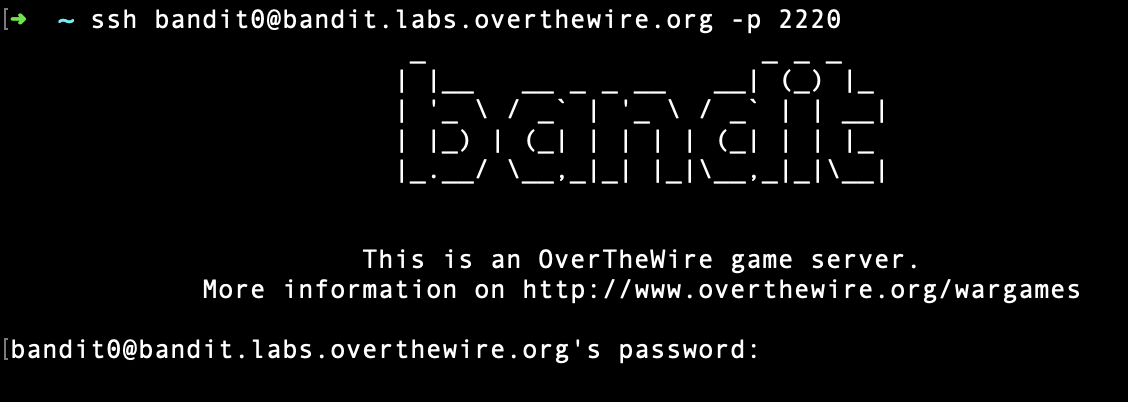
you then get access:
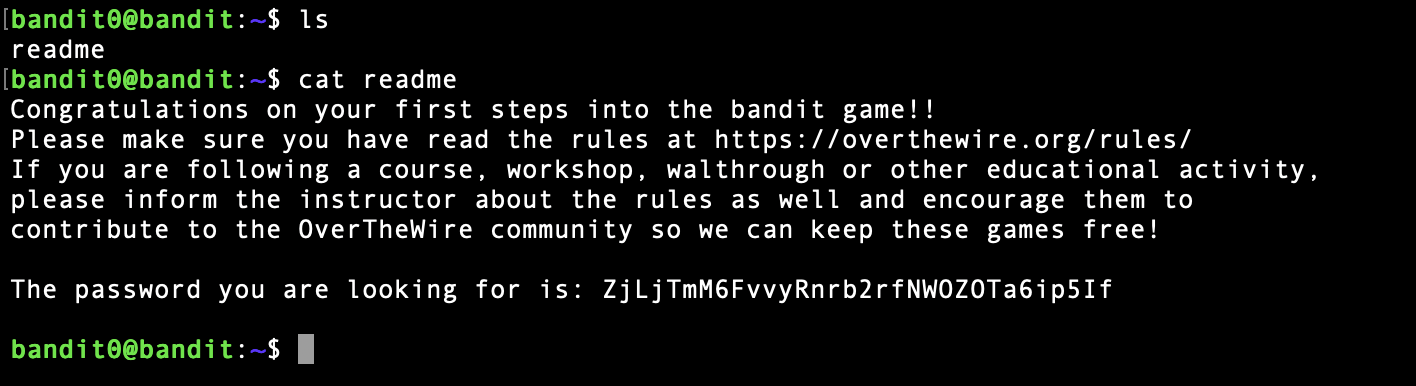
what i did here is listed the files in the directory i am in using ls (list) and see a file readme and i read its content using cat readme. cat command seems cute but it reads the content of a file, cat means concatenate, to read out contents of a file basically.
and we get the password: ZjLjTmM6FvvyRnrb2rfNWOZOTa6ip5If.